
How to Never Miss a K-pop Comeback: 5 Ways to Track Releases
K-pop release information is scattered across artist accounts, agency notices, streaming services and different timezones. Many Korean releases use 6 PM KST, but the calendar also contains noon, 1 PM and 9 AM releases — plus entries with no announced time. Here’s a realistic system for keeping up, whether you follow two groups or twenty.
1. Follow the official channels — but strategically
Agencies announce through different combinations of official websites, social accounts and fan platforms such as Weverse. The problem is volume: following many accounts means announcements drown in daily content.
The strategic version: turn on notifications for your top two or three groups only, and let a calendar site (like this one) catch everything else. You’ll never miss your bias, and you won’t have notification fatigue.
2. Set up YouTube properly
Music videos appear on the artist’s or agency’s official channel. Subscribe and choose the notification setting you want for the channels you care about. When an upload is scheduled as a YouTube Premiere, its public watch page lets you set a reminder before it starts. Not every music video is scheduled as a Premiere, so use this when the button is actually available.
3. Use pre-saves and Release Radar
A pre-save can add an announced release to your library when it becomes available, but the exact flow depends on the campaign and service. Spotify’s Release Radar updates on Fridays with music from followed and recommended artists. It is a useful weekly safety net, not a release-minute alert for every artist.
4. Learn the timezone math once
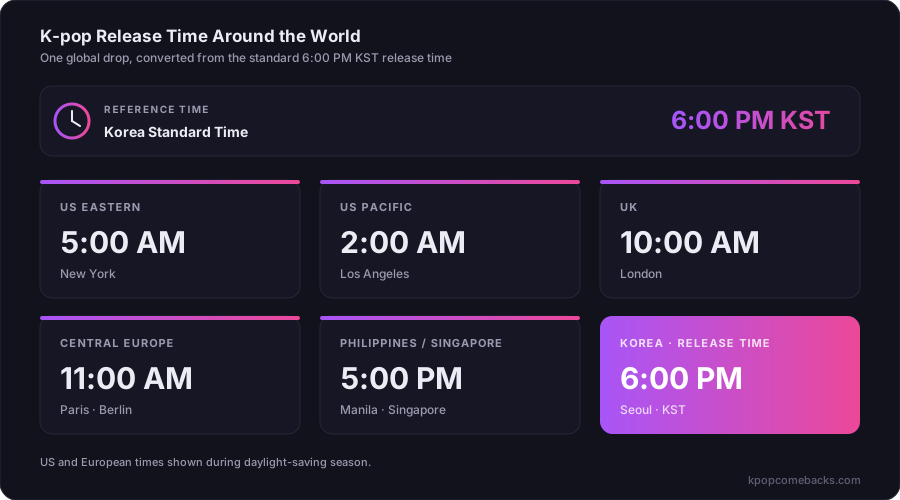
Two KST times recur often in K-pop schedules: midnight for teaser posts and 6 PM for music releases. They are patterns, not defaults for an unannounced time. When 6 PM KST is confirmed, this is what it means in several timezones during daylight-saving months:
| Your timezone | 6 PM KST release |
|---|---|
| US Eastern | 5:00 AM same day |
| US Pacific | 2:00 AM same day |
| UK (BST) | 10:00 AM same day |
| Central Europe (CEST) | 11:00 AM same day |
| Philippines / Singapore | 5:00 PM same day |
(Shift these by an hour when daylight saving changes — Korea doesn’t observe DST.)
5. Keep one calendar as your source of truth
Individual announcements are scattered across many accounts and can be revised — dates move and release titles change. A maintained monthly calendar consolidates all of it in one place.
That’s the reason the KpopComebacks calendar exists: confirmed releases across the KR, JP, US and UK regions we cover, organized by month and revised when verified details change. Bookmark the current month and check it on the schedule that suits you. Announced Korean and Japanese release times are converted to your device timezone next to KST or JST, and the upcoming page lets you subscribe from your own calendar app — Google Calendar, Apple Calendar, or Outlook — so confirmed releases simply appear in your week.
The realistic setup
If you only do three things: choose YouTube notifications for your top groups, use pre-saves when they are offered, and keep one release calendar. No setup catches an unannounced surprise in advance, but this combination covers official alerts, scheduled releases and a weekly discovery fallback.
Comments
Loading comments…